
FX-Framework User Presets
Requires N64Digital firmware >= 1.5.13 for all described features
Requires PFX PS1Digital firmware
- Refer to FX-Framework-WebUI.html for how to connect to the web interface.
FX-Framework supports creating user presets using the WebUI. User preset files can be up-/downloaded and shared and edited with a text editor.
Format#
INTERNAL_NAME1=DISPLAY_NAME1,DATA1
INTERNAL_NAME2=DISPLAY_NAME2,DATA2
[USER_CATEGORY1]
INTERNAL_NAME3=DISPLAY_NAME3,DATA3

; lines starting with a ; or # or empty lines are ignored
-
INTERNAL_NAMEnPreset name (usually generated by create preset). When creating this file manually, this has to be a unique name ([a-z0-9]) -
DISPLAY_NAMEnDisplay name of the preset as shown in the OSD (this can be any string without,(this is the field separator)) -
USER_CATEGORYnYou can define categories, which are shown as a folderUser/USER_CATEGORYnin the OSD. All presets after a category definition will go into this category. -
DATAnserialized preset data (as generated by FX-Framework's preset create)Detailed description
DATAnstores the follwing parameters (comma separated values). A-means, that this parameter is not changed by this preset.-
DATAn[0]: zoom factor (relative to an image 240px in height) asdouble -
DATAn[1]: display aspect ratio as fractionint / int -
DATAn[2]: horizontal interpolation kernel:-
4: off -
0: sharp -
1: soft -
5: softer
-
-
DATAn[3]: vertical interpolation kernel:-
4: off -
0: sharp -
1: soft -
5: softer
-
-
DATAn[4]: vertical scanlines mode:-
0: off -
1: on -
2: adaptive
-
-
DATAn[5]: vertical scanlines saturation -
DATAn[6]: vertical scanlines strength -
DATAn[7]: vertical scanlines thickness -
DATAn[8]: vertical scanlines glow -
DATAn[9]: horizontal scanlines mode:-
0: off -
1: on -
2: adaptive
-
-
DATAn[10]: horizontal scanlines saturation -
DATAn[11]: horizontal scanlines strength -
DATAn[12]: horizontal scanlines thickness -
DATAn[13]: horizontal scanlines glow -
DATAn[14]: deblur:-
0: off -
1: on
-
-
DATAn[15]: reserved -
DATAn[16]: reserved -
DATAn[17]: smoothing settings bitmask -
DATAn[18]: slotmask mode:-
0: off -
1: on -
2: boost
-
-
DATAn[19]: slotmask matrix (8x8 3bit integer values, 24 byte) -
DATAn[20]: slotmask width -
DATAn[21]: slotmask height -
DATAn[22]: slotmask strength -
DATAn[23]: gamma asdouble, if the value is-1.0and a custom gamme table was uploaded, use the custom gamme table,1.0otherwise (a custom table is currently not serialized to the preset data)
-
Download / Export#
Download presets.ini on the WebUI exports the user preset configuration
Preset Create dialog#
Presets are created from the currently active settings!
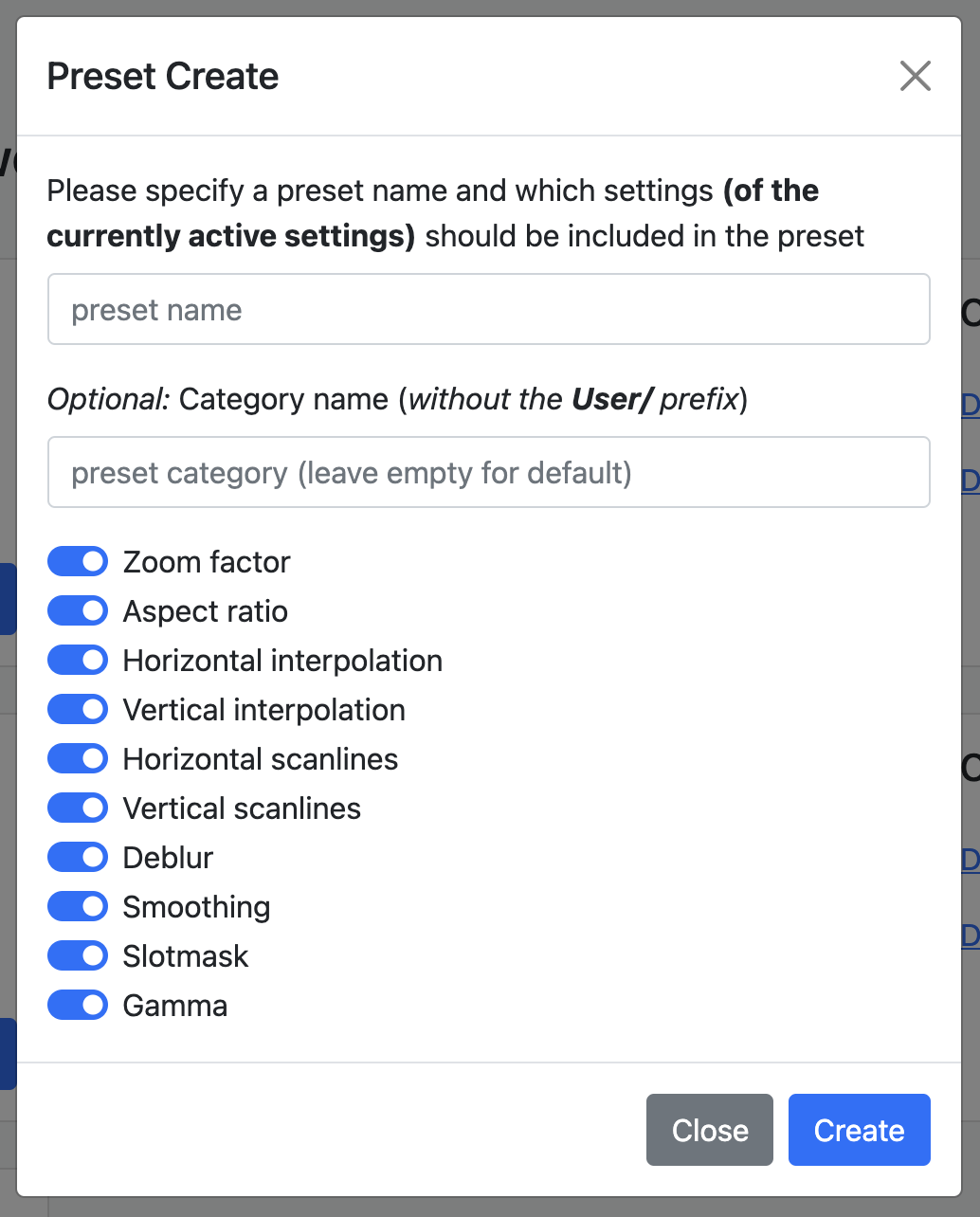
-
preset name: Name of the preset as displayed on the OSD (required) -
preset category: (optional)-
if empty, the preset is stored without a category and displayed in the
Userpreset folder on the OSD -
if set, the preset is stored as under
[<category_name>]and displayed asUser/<category_name>on the OSD
-
-
Zoom factor/Aspect ratio/ ... (at least one required)FX-Framework presets can be configured to hold all or only certain aspects of the configuration.
For example, it's possible to create a preset, which only affects the aspect ratio settings. In this case - when creating the preset - only the
Aspect ratioswitch would be set. When applying the preset from the OSD, only the aspect ratio will be changed. All other settings will remain unchanged.The OSD shows the settings affected under
This preset changes:when selecting a preset.
Hints#
-
Currently, 64 preset slots are available in total (shared between system and user presets)
-
At the moment(refresh preset menu was added sinceOSD->Presetis not refreshed automatically after uploading a presets.ini, so please exit this menu and re-enter it again.1.5.15(not released yet))
Example#
; fx-framework user-preset dump
user1=Test 1,4.5,4/3,1,1,0,100,50,-3.6,-3.6,0,100,50,-3.6,-3.6,1,0,0,5,0,00 00 00 00 00 00 00 00 00 00 00 00 00 00 00 00 00 00 00 00 00 00 00 00,1,1,0,-
user2=Test 2,-,-,0,1,-,-,-,-,-,100,20,-4.68,1,1,1,-,-,-,-,-,-,-,-,-
[Slotmasks]
user11=Demo Slotmask,-,-,-,-,-,-,-,-,-,-,-,-,-,-,-,-,-,-,2,00 00 00 00 00 00 00 00 00 00 00 00 01 48 4a 01 48 4a 00 94 a4 00 94 a4,6,4,100,-